
Take the register without stopping the lecture
Start class on your phone in a few taps. Students check themselves in from their seats while you teach.
CSC101 – Introduction to Computing
00:12:40
184
students checked in
In class
-
Start class in a few taps
Open Vouch, choose the course and tap Start Session. A live count shows how many students have checked in.
-
Check-in closes by itself
After 15 minutes by default. Your university sets the number. You can close it earlier with one tap, and the class keeps running either way.
-
Mark a student present by hand
If a student’s phone has died or they left it at home, mark them present yourself. Reports show manual entries separately.
-
Works with no internet
Your phone keeps the register until it has internet, then uploads it. A dead campus network doesn’t cost you a class.
-
A QR code for phones without Bluetooth
Tap Show QR Fallback and the student scans the code from your screen to check in.
-
Covering for a colleague
A course can have several lecturers, and any of them can start its class. When you take a colleague’s class, mark it as a substitute class as you start it, so the records show who ran it.
Your course reports
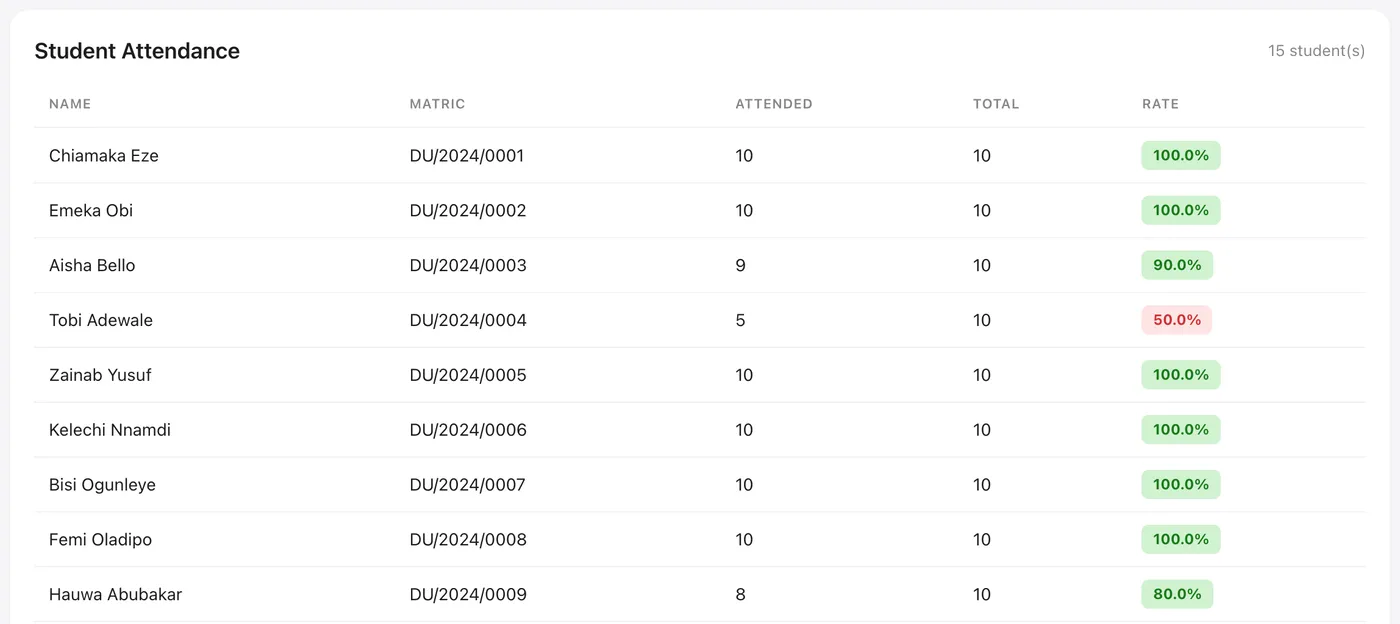
For each course you teach: classes held, average attendance and every student’s record.
Students below the university’s threshold are flagged, so you can speak to them before it becomes a problem at exam time.

What you need
- An Android phone, or an iPhone on iOS 15 or later, with Bluetooth. On iPhone, Vouch is on the App Store.
- The Vouch app and a staff account. Your university sets both up when it joins Vouch.
- Your courses for the term, which your department admin assigns to you.
Your university receives the user manual, which walks through a class step by step. Answers to common questions are on the help page.
Bring Vouch to your department
Ask your head of department or registry to request a beta place, or book a demo and we’ll show your colleagues.